charter-app
Charter App Documentation
- White Ballance
- RAW to XYZ D50
- Delta-E CIE2000
- D50 to D##
- XYZ D50 to target Color Space
- RAW to sRGB
- Print Samples
- Save CSV
Results
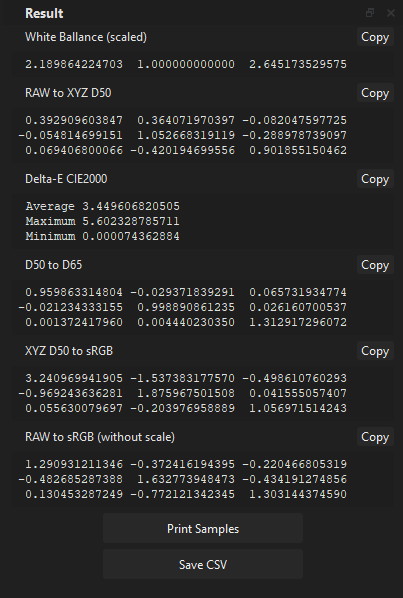
Every output field can be copied to the clipboard. The output format for copied data depends on the used settings: Plain, Numpy, Eigen, Matlab, GLSL, CSV. Outputs can be varied depending on used CCM Estimation settings.
White Ballance
Show estimated per-channel scale. Depend on used CCM Estimation settings show:
- Normalized - the sum of channel intensities is not changed, or the sum of scales equals 3.0.
- Scaled - estimated scales adjusted to the smallest intensity equal 1.0
- Identity - if used single step mode. And WB scales included in RAW to XYZ D50
RAW to XYZ D50
Show estimated RAW Color Space to CIE XYZ (D50 white point) color transformation matrix (CCM). Depend on used CCM Estimation settings show:
- if used two step mode RAW to XYZ D50 color transfomation matrix wihtout embedded WB scales.
raw_to_xyz_ccm * (raw_colors * wb_scales) - if used single step mode RAW to XYZ D50 color transfomation matrix with embedded WB scales.
raw_to_xyz_wwb_ccm * raw_colors
Delta-E CIE2000
Show estimated Delta-E CIE2000 error between reference colors and sampled colors with CCM or WB and CCM applied.
- Average average Delta-E error from all measured swatches
- Maximum maximal Delta-E error from all measured swatches
- Minimum minimal Delta-E error from all measured swatches
D50 to D##
D50 White Point to D## White Point chromaticity adaptation matrix (Von Krees). Chromaticity adaptation matrix to provide a proper adaptation between XYZ D50 White Point to XYZ D## White point.
XYZ D## to target Color Space
Integrated XYZ D50 to sRGB D65 color transformation matrix.
RAW to Target Color Space RGB
Show estimated, integrated RAW Color space to target color space transformation matrix. Depend on used CCM Estimation settings show:
- CCM without WB scales - RAW to sRGB transformation matrix that can be used after White Ballance is applied to convert RAW white-balanced colors to sRGB colors.
- CCM with WB scales - RAW to sRGB transformation matrix that can be used to convert directly RAW colors to sRGB with white balance in a single step.
CCM with WB scales is not recommended, as multiplying raw colors by CCM can’t reconstruct, repair, or clamp highlights. As a result, highlights can have unexpected results. Pure pink color highlights are one of the common results when using this matrix.
Print Samples
Output two windows with sampled colors:
- Source - sampled source colors.
- Corrected - corrected colors with applied CCM and WB scales.
Save CSV
Output CSV file with:
- Reference LAB - reference colors in CIE LAB color space.
- Reference XYZ - reference colors in CIE XYZ color space.
- Original RGB - sampled source colors in RGB color space.
- Linear RGB - sampled source colors in linear RGB color space.
- CCM - estimated CCM matrix.
- Coordinates - coordinates of placed patches on the image (optional).
Digital Camera Profile
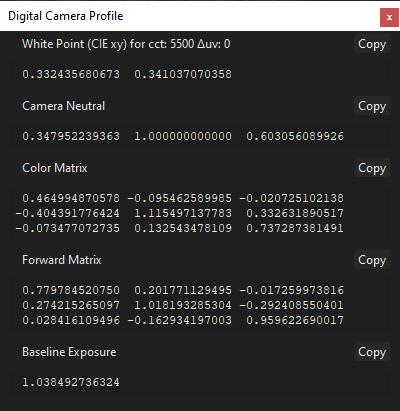
White Point
White point CIE xy coordinates of Illuminant.
Camera Neutral
DNG/DCP Camera Neutral coordinates.
Color Matrix
DNG/DCP ColorMatrix1.
Forward Matrix
DNG/DCP ForwardMatrix1.
Baseline Exposure
DNG/DCP baseline exposure. Scale corrected colors to match color chart reference values in destination color space.
Range Mapping
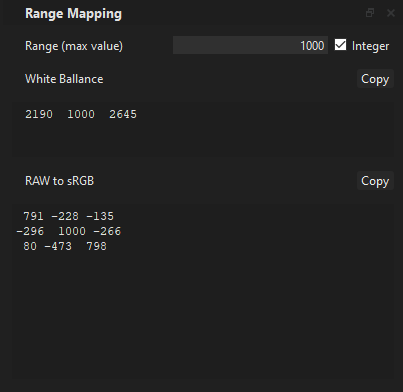
Optional results post-processing window (hidden by default). It can help convert results to use in processes that use fixed-precision pipelines (common for machine vision cameras or GPU/ASIC). Or just a map of the desired range.
Range Max Value
Define Max Value for new range 0 - Max_Value. Integer - round results to nearest integers.
White Ballance
White Ballance values normalized to have a max value equal to 1.0 and multiplied by a Max Value and rounded to the nearest integer in case of using Integer
RAW to target Color Space
RAW to sRGB matrix values normalized to have a max value equal to 1.0 and multiplied by a Max Value and rounded to the nearest integer in case of using Integer